Part A PC-ACE training module: Getting started
Enroll with EDI
- Prior to using the program all users must enroll for PC-ACE using the EDI enrollment form (8292) or SPOT enrollment form (8292P)
- Once enrollment is complete the EDI approval letter will be sent from First Coast that will include your submitter ID, mailbox ID (SFTP submitters only) and instructions for downloading the software.
- This letter includes the installation and upgrade password. The upgrade password does not change and is needed for each quarterly upgrade; therefore, please keep it in a safe place where it is readily available.
- Next, access the PC-ACE upgrade & installation instructions and download the program.
- Then complete the following steps to set up the program.
Sign on procedures
- Open the PC-ACE software
- Select 'Help' then 'About PC-ACE'
- Ensure the current version is installed
- Refer to PC-ACE upgrade & installation instructions for available versions. An installation password will be required.
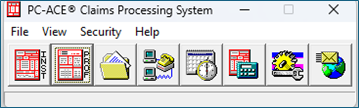
- Select the icon from the Main Toolbar:
- Reference File Maintenance
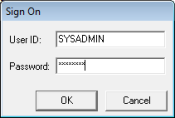
- Enter SYSADMIN for both User ID and Password