


Cruising through the CERT claim review process
The Comprehensive Error Rate Testing (CERT) program was established to monitor and report the accuracy of Medicare fee-for-service (FFS) payments. Medicare contractors use CERT data to identify areas of focus for medical review and provider outreach and education efforts.
The CERT claim review process works much like other review programs. There’s four critical points in the CERT claim review process. Here’s what you need to know:
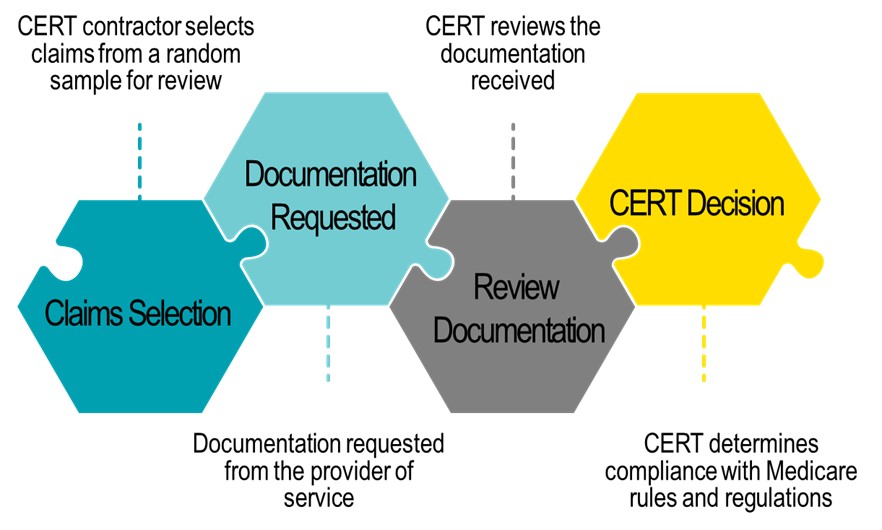
How can providers cruise through the CERT review process?
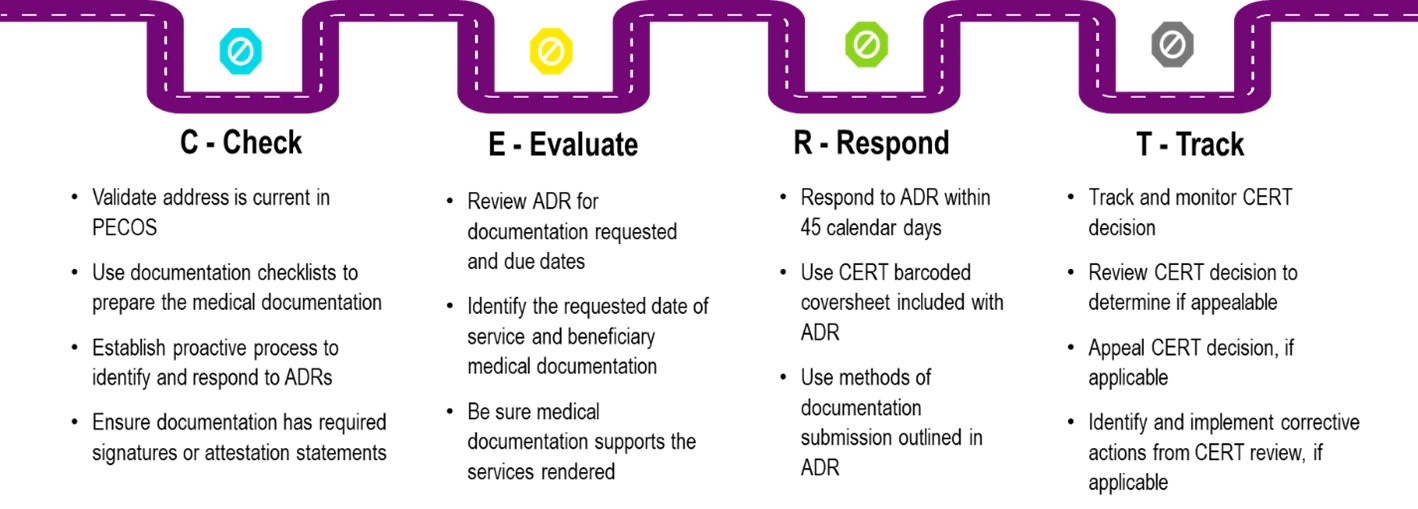
C-Check
Prior to starting the CERT review process, providers are encouraged to initiate and validate the following processes within their organizations:
- Validate the Medical Records Correspondence Address on file within Provider Enrollment, Chain and Ownership System (PECOS) is current to ensure timely receipt of CERT additional documentation requests (ADR)
- The initial ADR is mailed to the address listed in PECOS for the provider that billed or submitted the claim
- Additional ADRs may be sent to an alternate address:
- Contact CERT Customer Service at 888-779-7477 to update or provide an alternate mailing address
- Chain addresses:
- Providers with five or more provider numbers may designate a single point of contact to receive ADRs
- Call CERT Customer Service at 888-779-7477 with the list of provider numbers and the selected point of contact's information
- Start incorporating documentation checklists today as a best practice. While the documentation checklists are not a part of the medical record, they can be used as a guide to ensure the documents listed are included when the claim is sampled for review.
- First Coast checklists: Medical documentation/checklists
E-Evaluate
The second stop in cruising through the CERT process is to evaluate the ADR.
ADR letters for CERT are sent to the address on file with the PECOS for the provider that billed the claim.
After an ADR is received, it's important to review it to clearly understand what documentation is being requested. While reviewing the ADR, take note of the date of service and the beneficiary the documentation is being requested for. Be sure to include the requested information and include any other documentation that is needed to support the services rendered.
The billing provider is the entity who receives the ADR. There may be times when documentation is needed from the beneficiary's primary physician. All physicians involved with the beneficiary's care should coordinate the care and send the required documentation to support the services.
R-Respond
The third stop in cruising through the CERT process is to reply to the documentation request. Prior to submitting documentation:
- Ensure all photocopies are legible and complete with beneficiary identification
- Verify the documentation contains both sides of each page (including page edges)
- Attach the coversheet that accompanied the request letter to the front of the applicable claim documentation
- The CERT review contractor has assigned a unique 7-digit identifier to each claim. The CID (claim identification number) is found throughout the CERT request letter
- Please insert the CID number when responding to CERT
- Providers must respond to the ADR within 45 calendar days
If documentation for more than one claim is included in the response, please attach each coversheet to the appropriate claim documentation. All requested documentation must be submitted by the due date specified in the letter. The CERT review contractor will make several attempts, via letter and phone, to obtain the necessary information. Not responding to a CERT request will result in a claim denial and a request for refund of amount reimbursed is issued.
Read through the Fast Facts: CERT Documentation Submission for information on the submission timelines and methods.
T-Track
The final stop in cruising through the CERT process is tracking your CERT decision. The claim identifier (CID) lookup was developed so providers can obtain a status of their CERT sampled claims. Providers are encouraged to use the lookup to check the status of a CERT claim review.
Examples of CERT status include:
- Error
- No error
- Excluded/discarded from sample
If the claim is pending review with the CERT contractor, the file will indicate the status. Read the article Fast Facts: Checking the Status of Your CERT Review for more information about the status of a CERT review.
CERT decisions are appealable with the MAC contractor. To find out more about appealing a CERT decision review the following article:
Do you need more information about the CERT program?
Here is a list of resources available to help you with the CERT review process.
C3HUB: C3HUB website gives providers and stakeholders access to letter and contact information, documentation request listings, ways to submit documentation, claim status search feature, and much more.
CERT reports: Each November, the Department of Health and Human Services (HHS) publishes an improper payment rate. CMS later publishes more detailed improper payment rate information in the form of the annual Medicare Fee-for-Service (FFS) Improper Payments Report and Appendices. The reports are listed in year order.
CERT: Official CMS CERT website providing information regarding the CERT program, contractors, reports and CERT national improper payment rates.
First Coast CERT Program center:
- CERT overview
- Educational resources
- Medical documentation/checklists
- CERT A/B MAC Outreach & Education Task Force
- CERT claim identifier (CID) lookup
Visit the events calendar to view upcoming webinars and the On-Demand Learning to view webinar recordings and click-and-play videos designed to support our providers in achieving Medicare compliance.